Can Bad Brake Pads Damage Rotors — Effects and Warning Signs
Yes, bad brake pads can absolutely damage rotors, and the damage usually goes beyond simple cosmetic wear. This article explains the specific ways worn or faulty pads harm rotors, the conditions that accelerate the damage, and the warning signs that tell you it is already happening.
Most drivers assume that brake pads simply wear out and need replacing, while the rotors remain fine until they get scored or warped. That assumption leaves many people confused when a simple pad replacement turns into a rotor replacement, or when a pulsating pedal appears shortly after new pads are installed. The real issue is that the pad and rotor work as a matched set, and when the pad loses its friction material or becomes contaminated, the rotor becomes the sacrificial part.
The outcome you want to protect is not just a quiet stop, but a braking system that stays smooth and safe for thousands of miles without premature wear.
In the sections below, I will walk through the mechanical relationship between pads and rotors, the specific failure modes that cause rotor damage, and the exact symptoms you should check for before they turn into an expensive repair. You will also learn when rotors can be resurfaced versus when they must be replaced, and how to choose the right replacement parts to avoid repeating the same mistake. By the end, you will know whether your rotors are at risk, how to inspect them properly, and what to tell a mechanic if you suspect pad-related rotor damage.
How Brake Pads and Rotors Work Together
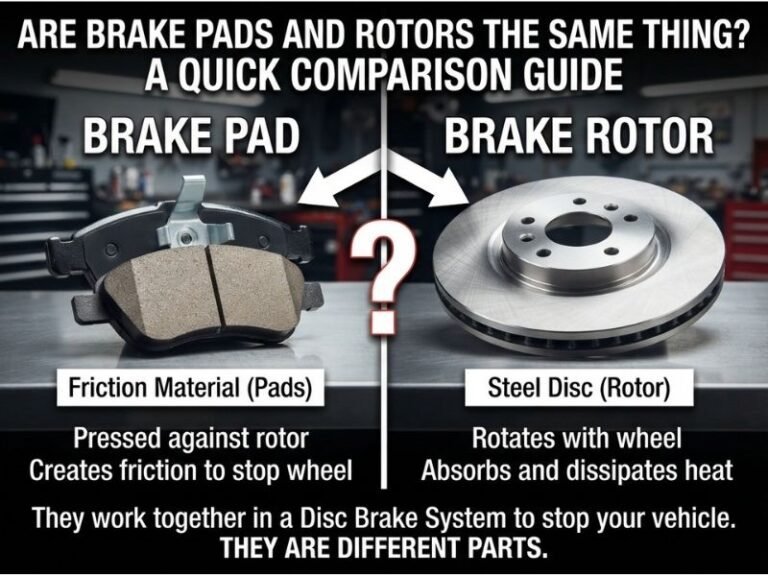
Brake pads are designed to press against the rotor surface to create friction, which converts the kinetic energy of your moving vehicle into heat. The rotor acts as a heat sink and a friction surface, dissipating that heat so the pads can keep gripping. Under normal conditions, the pad’s friction material wears down gradually while the rotor surface stays smooth and flat.
This is the intended design: pads are the consumable component, and rotors are meant to last through multiple pad replacements.
The problem starts when the pad no longer provides a clean, consistent friction surface. A healthy pad deposits a thin, even layer of friction material onto the rotor as it wears. That transfer layer is what gives you consistent stopping power.
When the pad is worn out, contaminated, or damaged, it stops depositing that layer evenly. Instead, you get metal-to-metal contact, uneven deposits, or localized hot spots, all of which directly harm the rotor.
The Main Ways Bad Pads Damage Rotors
There are several distinct mechanisms by which a failing pad can ruin a rotor. Understanding each one helps you identify which problem you are facing and what repair is actually needed.
Metal-on-Metal Contact
The most obvious and severe form of rotor damage happens when the pad’s friction material is completely worn away. Every brake pad has a steel backing plate, and when the friction material is gone, that steel plate presses directly against the rotor. The result is immediate, aggressive scoring.
The rotor surface gets deep grooves cut into it, and those grooves reduce the contact area for future pads. In severe cases, the rotor can lose enough material to become structurally weak, though that is rare in normal passenger vehicles.
This type of damage is not subtle. You will hear a loud grinding or scraping noise when you apply the brakes, and the pedal may feel rough or harsh. If you catch it early, the rotor might be resurfaced.
If you drive for any distance with metal-on-metal contact, the rotor will likely need replacement because the grooves are too deep to machine out safely.
Uneven Pad Wear and Tapered Pads
Brake pads do not always wear evenly. A pad can wear more on one end than the other, creating a wedge shape. This happens when the caliper slides or pistons stick, causing the pad to press at an angle against the rotor.
A tapered pad applies uneven pressure across the rotor surface, which leads to uneven rotor wear. Over time, the rotor develops a slight taper or thickness variation that you can feel as a pulsation in the brake pedal.
The rotor itself may still look smooth, but its surface is no longer perfectly flat. This condition is often misdiagnosed as a warped rotor when the actual cause is uneven pad wear. If you install new pads on a rotor with thickness variation, the new pads will wear unevenly too, and the pulsation will return.
Contaminated Pads
Brake pads can become contaminated with oil, brake fluid, grease, or road chemicals. A contaminated pad loses its ability to grip the rotor evenly. Instead of a smooth friction layer, you get patches of material that grab and release as the rotor spins.
This creates localized hot spots on the rotor surface. Those hot spots can cause the rotor to develop hard spots or even small cracks over time.
Contamination often comes from a leaking caliper or wheel bearing grease, but it can also happen during a sloppy brake job where someone handles the pad surface with dirty hands. If you see blue or dark discolored patches on the rotor, that is a sign of heat damage from contaminated or glazed pads.
Glazed Pads
Glazing happens when the pad gets overheated to the point where its friction material hardens and becomes smooth and shiny. This can occur from aggressive braking, towing, or a stuck caliper that keeps the pad pressed against the rotor. A glazed pad has very little friction, so you have to push harder on the pedal to stop.
That extra pressure generates more heat, which further hardens the pad and can cause the rotor to overheat and warp.
Glazed pads also deposit a hard, uneven layer onto the rotor. That deposit causes vibration and reduces braking performance. In many cases, both the pads and rotors need to be replaced because the rotor surface has been heat-damaged beyond what resurfacing can fix.
Warning Signs That Your Pads Are Damaging Rotors
Catching the problem early can save you the cost of new rotors. Here are the warning signs that your brake pads are already causing rotor damage.
Grinding or Scraping Noises
A grinding noise when braking is the classic sign of metal-on-metal contact. This means the friction material is gone, and the backing plate is cutting into the rotor. If you hear this, stop driving and have the brakes inspected immediately.
Every mile you drive with this noise makes the rotor damage worse.
Pulsating Brake Pedal
If the brake pedal pulses or vibrates when you apply pressure, the rotor surface has likely developed thickness variation. This is often caused by uneven pad wear or pad material transfer. The pulsation is your car telling you that the rotor is no longer flat.
Vibration in the Steering Wheel
A vibration in the steering wheel during braking usually indicates that the front rotors are damaged. This can be from warping, hot spots, or uneven wear. While a pad issue may have started the problem, the rotor is now the component that needs attention.
Visible Grooves or Ridges
If you can see the rotor through the wheel spokes, look for deep grooves, ridges, or a rough surface. A rotor with visible scoring has already been damaged by the pads. The question is whether the damage is shallow enough to resurface or deep enough to require replacement.
Reduced Braking Performance
If the car takes longer to stop or the pedal feels soft, spongy, or hard, your pads may be failing. Reduced braking performance means you are pushing harder, which generates more heat and accelerates rotor damage.
Can You Resurface or Must You Replace?
When a rotor has been damaged by bad pads, the repair decision depends on the severity of the damage and the rotor’s remaining thickness.
Minimum Thickness Specifications
Every rotor has a minimum thickness specification stamped into it or listed in the service manual. This is the thinnest the rotor can be and still safely dissipate heat. If resurfacing would bring the rotor below that minimum, it must be replaced.
A rotor that is too thin can crack or fail under heavy braking.
Depth of Grooves
Light scoring that is less than 1/16 inch deep can often be machined out during resurfacing. Deeper grooves require replacement because removing enough material to eliminate them would leave the rotor too thin. A good rule of thumb is that if the grooves catch your fingernail, the rotor is likely beyond resurfacing.
Heat Damage and Cracks
Rotors that have been severely overheated may have heat cracks or hard spots. These cannot be repaired by resurfacing. Heat cracks can propagate and cause the rotor to fail suddenly.
Any rotor with visible cracks should be replaced immediately.
What Happens If You Ignore Rotor Damage
Driving on damaged rotors is not just a comfort issue. It is a safety issue. A rotor with deep grooves has less surface area for the new pads to grip, which reduces braking performance.
A rotor with thickness variation causes pulsation that can make it harder to modulate braking in an emergency. A rotor with heat cracks can fail catastrophically, leaving you with no braking on that wheel.
Ignoring rotor damage also costs you more money in the long run. If you replace only the pads on a damaged rotor, the new pads will wear unevenly and may fail prematurely. You will end up doing the brake job twice, paying for labor and parts that could have been avoided with a proper diagnosis.
How to Prevent Pad-Related Rotor Damage
Prevention starts with regular brake inspections and timely pad replacements. Brake pads have wear indicators that squeal when the friction material is low. Do not ignore that squeal.
It is designed to warn you before the pad reaches the backing plate.
When you replace pads, have the rotors inspected and measured. If the rotors are within specification and the surface is smooth, they can be reused. If there is any doubt, resurfacing is a relatively inexpensive way to ensure a fresh, flat surface for the new pads.
Many shops offer free rotor inspection with a pad replacement, so there is no reason to skip this step.
Also, address any caliper issues promptly. A sticking caliper causes uneven pad wear and overheats the rotor. If you notice that one wheel is hotter than the others after a drive, or that the car pulls to one side during braking, have the caliper checked before it ruins new pads and rotors.
FAQ
How long can you drive on bad brake pads before
There is no set mileage because it depends on how worn the pads are and your driving habits. Once the friction material is gone and you hear grinding, damage to the rotor begins immediately. Even a short drive with metal-on-metal contact can score the rotor deeply enough to require replacement.
Can slightly worn brake pads damage rotors?
Slightly worn pads that still have friction material do not damage rotors under normal conditions. The damage starts when pads wear unevenly, become glazed, or are contaminated. Regular inspection catches these issues before they progress to rotor damage.
What does rotor damage from bad pads look like?
You will see deep grooves or scoring on the rotor surface, often with a rough, metallic appearance. In heat-damaged cases, you may see blue or dark discolored patches. In severe cases, small cracks may appear near the edges of the friction surface.
Do new brake pads damage old rotors?
New pads do not damage old rotors if the rotors are within specification and have a smooth surface. However, if the old rotors have deep grooves or thickness variation, new pads will not seat properly and may wear unevenly. That is why resurfacing or replacing rotors is often recommended with a pad replacement.
Is it safe to drive with a pulsating brake pedal?
A pulsating brake pedal indicates uneven rotor wear that reduces braking effectiveness. It is safe for short trips at low speeds, but it compromises your ability to stop smoothly in an emergency. Have the brakes inspected promptly to prevent further damage.
Can bad brake pads damage rotors on one wheel only?
Yes, if a caliper is sticking on one wheel, that pad will wear faster and damage that rotor while the other side remains fine. This is why brake inspections should always check both sides and the caliper operation.
Conclusion
Bad brake pads can damage rotors through metal-on-metal contact, uneven wear, contamination, and glazing, and the damage ranges from surface scoring to structural cracks that require immediate replacement. The most important thing to remember is that rotor damage is progressive; the longer you drive with failing pads, the more expensive the repair becomes. The major limitation is that you cannot always see the damage without removing the wheel and measuring the rotor, so professional inspection is the safest course of action.
If you hear grinding, feel pulsation, or notice reduced braking performance, have your brakes checked right away. Ask the shop to measure the rotor thickness and show you the surface condition before you approve any repair, and replace pads at the first sign of wear to protect your rotors and your safety.